The Problem: Flat Fees Don't Scale
You built an AI agent, customers pay for it. But some hammer your API all day, others send a few messages a week. A flat fee loses money on heavy users and overcharges light ones. You need usage-based billing.
Whether your agent runs on a self-hosted model or calls OpenAI, Anthropic, or Gemini, the billing pipeline is the same: map each request to a customer, count tokens, convert to dollars, generate invoices. That's what this tutorial builds.
The Stack: LangChain + Kong Konnect
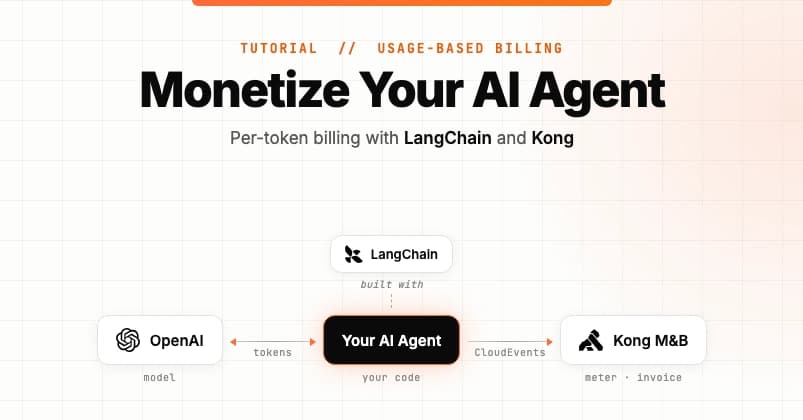
The agent uses LangChain, which abstracts the model layer. Metering works identically whether you use gpt-4o-mini or any other model. A custom LangChain callback records input/output token counts per customer. Those records flow to Kong Konnect Metering & Billing, which tallies usage, applies pricing (input and output tokens can have different rates), and produces monthly invoices.
Architecture Overview
Every LLM call produces two CloudEvents: one for prompt tokens, one for response tokens. Each event carries a subject field (customer ID). Kong groups events by subject, sums tokens, multiplies by the rate card on the customer's plan, and rolls into invoices.
Why Kong?
- Open source core: Metering is built on OpenMeter. Self-host or use managed Konnect.
- Configurable billing: Meters, features, plans, rate cards, subscriptions are portal-configured, not code-shipped.
- You keep Stripe: Kong is the metering/invoicing layer that feeds Stripe—not a replacement.
What You'll Build
- A LangChain callback handler that emits two CloudEvents per LLM call.
- A Kong meter filtering
kong.llm_requestevents, summing tokens. - Two features (input tokens, output tokens) feeding a plan with separate rate cards.
- A customer subscribed to that plan, with metered usage and dollar values in Konnect.
Prerequisites
- Node.js 22.6+
- pnpm (
npm install -g pnpm) - OpenAI API key
- Free Kong Konnect account
- Konnect Personal Access Token with Metering & Billing write permissions
Part 1: Add Metering to the AI Agent App
Clone and Install
git clone https://github.com/tejakummarikuntla/llm-metering-langchian-kong
cd llm-metering-langchian-kong
pnpm install
Configure Environment
Copy .env.example to .env and fill in:
API_URL=https://us.api.konghq.tech/v3/openmeter/events
API_KEY=your-konnect-personal-access-token
SUBJECT=acme
MODEL=gpt-4o-mini
OPENAI_API_KEY=your-openai-api-key
Code Walkthrough: MeteringCallbackHandler
The handler extends LangChain's BaseCallbackHandler and implements two hooks:
handleLLMStart - Captures run metadata before the model call. Importantly, it merges parent run metadata (set at chain.invoke time) into the child LLM run, so the customer ID propagates correctly.
handleLLMEnd - Reads token counts from output.llmOutput.tokenUsage, builds two CloudEvents (prefix -input and -output), and POSTs them to Kong's ingestion endpoint. The id field combines LangChain's runId with the suffix, enabling Kong deduplication on retries. The data.type separates input/output tokens for per-class pricing.
Wire It Up (index.ts)
const handler = new MeteringCallbackHandler(apiUrl, apiKey);
const llm = new ChatOpenAI({
  model,
  apiKey: openaiApiKey,
  callbacks: [handler],
});
const chain = PromptTemplate.fromTemplate('{input}')
  .pipe(llm)
  .pipe(new StringOutputParser());

const result = await chain.invoke(
  { input: userInput },
  { metadata: { subject, kong: 'strong' } },
);
Two lines do the integration: callbacks: [handler] on the LLM instance, and the metadata block on chain.invoke carries the customer ID.
Run It
pnpm start
Type a prompt. The handler logs each event. Both events reach Kong but won't appear in customer usage until Part 2.
Part 2: Connect to Kong Metering & Billing
Create the LLM Tokens Meter
In Konnect console: Metering & Billing → Metering → Create Meter. Choose the LLM Tokens template—it sets:
- Event type filter:
kong.llm_request - Aggregation: Sum
- Value property:
tokens(readsdata.tokens)
Alternatively, use the API (see source for curl example).
Create Features and Plan
Create two features: "Input Tokens" and "Output Tokens". Build a plan with separate rate cards for each (e.g., $1/input token, $2/output token). Then create a customer and subscribe them to the plan.
Inspect Usage
After running the agent, check the customer's usage view in Konnect. You'll see the token counts and calculated dollar amounts, matching the agent's logs.
Why This Matters
Usage-based billing is the standard for AI APIs. This tutorial gives you a production-ready pattern: open-source metering (OpenMeter), no vendor lock-in for your agent stack (LangChain), and a clear separation between metering and invoicing. You can self-host the metering or use Konnect's managed service.
Next Steps
Clone the repo, set up your Konnect account, and run the example. Then customize: add metadata for tenant tier or feature flags, adjust rate cards, or connect Stripe for payment collection. The pattern works for any LangChain-based agent, regardless of model provider.