Playwright vs BrowserAct: Where Test Automation Hits Real-World Anti-Bot Friction
You’ve built something with Playwright. It works perfectly in your local environment. CI is green. Tests pass. Then you deploy it against a real website. Immediately: 403 Forbidden, Cloudflare keeps loading, reCAPTCHA blocking everything. Or the page loads… but your agent gets silently flagged.
The problem isn’t your code. Modern websites actively inspect who is asking for content and decide within milliseconds whether you’re a real user or automation. Playwright was never designed for that.
This article breaks down exactly where Playwright breaks in production and how BrowserAct approaches the same problems differently.
What Playwright Does Well
Playwright is excellent for end-to-end testing, CI/CD pipelines, predictable internal applications, and cross-browser automation (Chromium, Firefox, WebKit). Its API is clean: auto-waiting, reliable locators, tracing and debugging tools, fast execution in controlled environments.
But there is an important assumption: the browser is controlled in a predictable, cooperative environment. That assumption stops holding the moment you target websites that actively resist automation.
Where Playwright Breaks: 5 Failure Modes
1. Browser Fingerprint Detection
Modern anti-bot systems inspect the browser immediately on page load. Playwright, in its standard configuration, leaks several automation signals:
navigator.webdriverdetectablenavigator.plugins.length = 0- User-Agent contains
HeadlessChrome - WebGL renders using SwiftShader
- TLS/HTTP2 fingerprint mismatch
- CDP automation traces detectable
- Playwright-specific runtime artifacts
Individually these seem small, but together they form a deterministic automation fingerprint.
2. CAPTCHA and Verification Walls
Playwright has no native mechanism to handle CAPTCHAs or human verification flows. Once reCAPTCHA v2/v3, Cloudflare Turnstile, DataDome, or HUMAN Security flows appear, the automation pipeline hits a hard stop. No built-in recovery. No continuation. Even external CAPTCHA solvers introduce latency, cost, and additional failure points.
3. Session Contamination in Parallel Workflows
Playwright supports multiple contexts, but isolation must be manually managed. Cookies can leak, storage state must be explicitly managed, parallel accounts can be correlated via shared fingerprints. Session hygiene becomes developer responsibility.
4. No Session Recovery After Failure
When Playwright hits a CAPTCHA, timeout, blocked request, or navigation failure, the workflow is lost. There is no native concept of pause, resume, handoff, or continuation from state. Everything restarts from scratch.
5. No Reusability Layer
Every Playwright automation is essentially “write → debug → maintain → rewrite.” When websites change, selectors break, flows shift, logic must be updated manually. There is no native concept of reusable “browser capability units.”
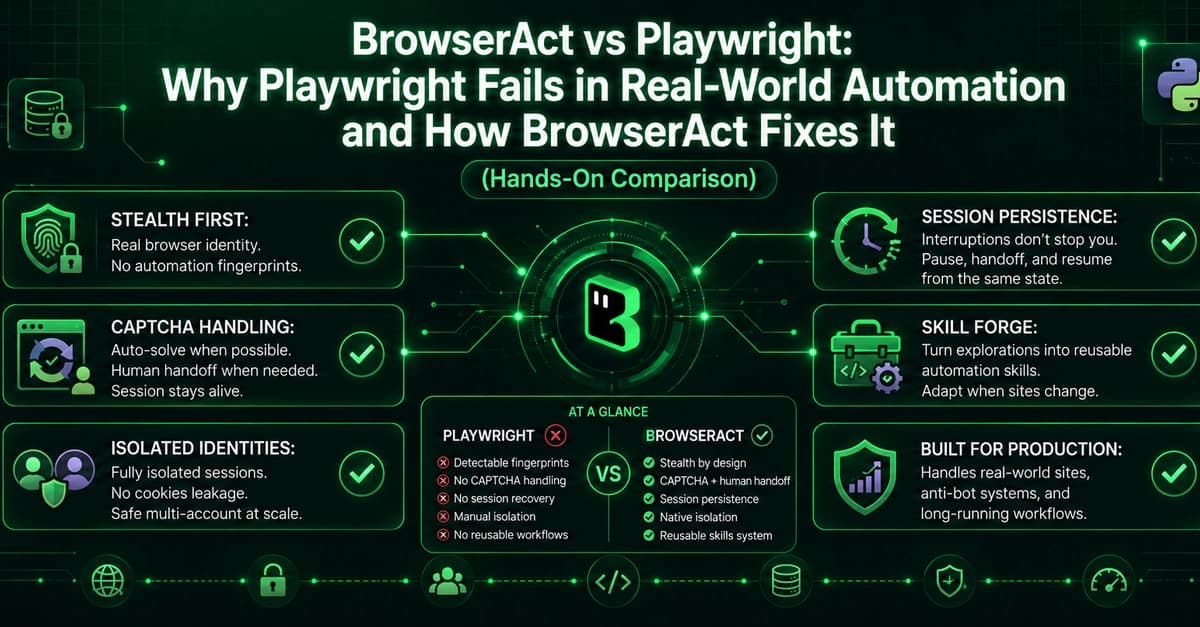
How BrowserAct Handles These Failure Modes
BrowserAct treats the browser as an execution environment for AI agents, not a script-controlled tool. It moves detection, interruption, and isolation responsibilities into the browser layer itself.
1. Stealth Browser Layer
BrowserAct reduces automation signals at the execution level:
- No exposed
navigator.webdriver - Realistic browser identity surface (valid plugin structure, normal GPU/WebGL rendering, consistent TLS fingerprinting)
- Chrome-aligned user agent (not HeadlessChrome)
Detection Comparison:
| Signal | Playwright | BrowserAct |
|---|---|---|
| WebDriver | Detected | Not detected |
| Plugins | 0 | 5 |
| User Agent | HeadlessChrome | Chrome/144 |
| CDP signals | Detected | Clean |
| WebGL | SwiftShader | Native |
| Bot detection sites | Fail | Pass |
2. CAPTCHA Handling + Human Handoff
BrowserAct does not treat verification as a failure. If solvable, it automates resolution. If not, it hands off to a human while keeping the session alive. No restart, no reset, no lost state.
3. Isolated Browser Identities
BrowserAct separates browser identities from task sessions. A browser identity provides isolated cookies, storage, fingerprint surface, and proxy configuration. This reduces cross-account leakage and allows controlled sharing of authentication state when needed.
4. Session Persistence After Interruption
When something breaks, BrowserAct preserves the session context. The session stays alive, state is preserved, a human can intervene, and automation resumes from the same point. Critical for long-running workflows.
5. Skill Forge: Reusable Automation Units
Instead of writing scripts that solve one instance of a task, Skill Forge allows a workflow to be explored once and converted into a reusable execution unit. The system learns how a site behaves, generates a structured reusable workflow, and can update the skill when the site changes instead of rewriting everything.
Hands-On: Same Task with Both Tools
I tested both tools against SannySoft browser fingerprint detection and a Cloudflare challenge page.
Test Environment: Windows, VS Code, Playwright, BrowserAct CLI, Chromium-based browsers.
Getting Started with Playwright:
npm init playwright@latest
Getting Started with BrowserAct:
uv tool install browser-act-cli --python 3.12
Test 1: Browser Fingerprint Detection
Playwright Result:
npx playwright codegen https://bot.sannysoft.com
The detection report showed:
- WebDriver: Present (Failed)
- Automation indicators visible
- Browser fingerprint characteristics associated with automation
BrowserAct Result:
browser-act --session test2 browse...
BrowserAct passed all fingerprint checks with its default configuration.
Why It Matters
If you're automating against production websites that use anti-bot measures, Playwright will fail silently or hit hard blocks. BrowserAct provides a production-ready alternative that handles fingerprint detection, CAPTCHAs, session recovery, and multi-account isolation out of the box. For developers building AI agents or automation pipelines that must survive real-world conditions, BrowserAct is worth evaluating now.