OpenAI Ships an Agent That Finishes the Job
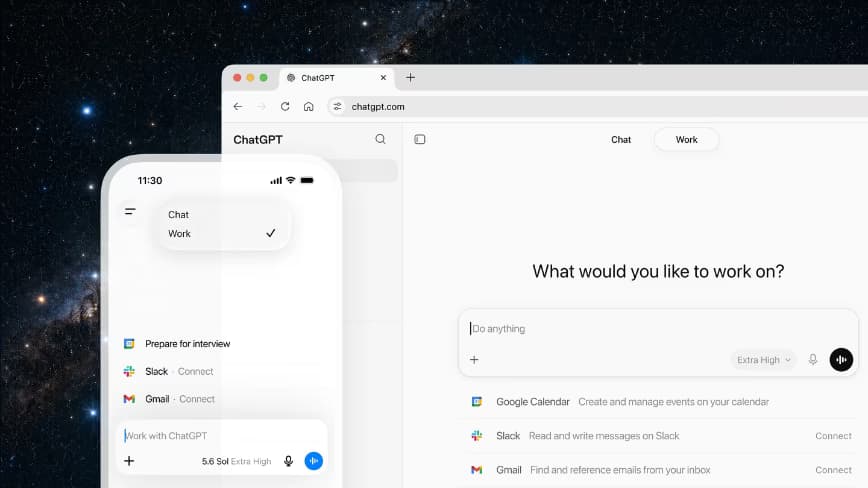
OpenAI has spent two years selling ChatGPT as a question-answering machine. With today's launch of ChatGPT Work, the company shifts focus: get the job done. The agent lives inside ChatGPT and can take action across apps and files, stay on a project for hours, and turn a goal into completed deliverables.
Powered by GPT-5.6 and Codex
The agent runs on GPT-5.6, the frontier model that launched the same day after clearing US government testing. OpenAI claims it's state-of-the-art at reasoning through multi-step tasks and producing materials that follow user templates and reference files. Under the hood, Codex—the engine behind GitHub Copilot's precursor—handles real work across web, mobile, and desktop. OpenAI says over five million people use Codex weekly, with more than a million now using it for non-software tasks. This follows the decision to merge ChatGPT and Codex under co-founder Greg Brockman.
How It Works
Users start with a familiar task: analyzing a month-end budget variance, turning source material into a marketing brief, or preparing for a sales meeting. The agent shows its progress, asks questions, accepts course corrections, and requires approval for important actions. It can also handle entire workflows from a single request. For example, turn customer research into a campaign brief, use that brief to create marketing assets, then adapt those assets for different markets—carrying context through each step.
OpenAI cites Angela Ferrante, head of enterprise marketing at Zapier, who used ChatGPT Work to build a system for reviewing thousands of leads monthly. It traced customer touchpoints across CRM and email, found broken follow-ups, and generated a weekly executive dashboard that surfaced seven figures in potential sales.
Desktop-First Strategy
ChatGPT Work moves between devices: start on phone, review on the go, check status between meetings, then pick up on desktop. The desktop app is where the strategy shows. There, ChatGPT can use local files and apps directly, and a new built-in browser lets it pull websites, tools, and online files in one place. OpenAI is merging the standalone Codex app into this new ChatGPT desktop app, which carries Chat, Work, and Codex together.
Codex itself gains new capabilities: inline editing within diffs, pull-request review in a side panel, faster computer use powered by GPT-5.6, and support for multiple repositories in a single project.
Plugins, Sites, and Scheduled Tasks
Users connect tools via plugins—Slack, Teams, Google Drive, SharePoint, email, calendars, CRMs, project trackers. ChatGPT decides when to reference a plugin automatically, or users can type "@" followed by the app name. A unified directory brings plugins into one place.
OpenAI also launches Sites in public beta: turn work or ideas into an interactive site or web app shareable by URL. Suggested uses: live dashboards, project trackers, launch calendars, prototypes, internal portals, interactive reports. ChatGPT can keep them updated as underlying info changes.
Scheduled Tasks handle repetitive work: perform an action once, repeat on a schedule or when an event occurs, or monitor for changes over time. Examples: refresh a recurring meeting agenda from new Slack updates, check dashboards each morning and send a summary, update a presentation when new feedback arrives by email. The user decides access, check-in frequency, and whether approval is needed.
Browser and Computer Use
On desktop, the built-in browser lets ChatGPT research, compare sources, pull info from websites, and open/refine files from Google Workspace and Microsoft 365. Computer Use goes further: ChatGPT operates a person's computer on their behalf—clicking, typing, moving files across apps, tools, and browser—either as a one-off or as part of a Scheduled Task. OpenAI also updates its Chrome extension so ChatGPT can be used in the browser's sidebar, and will sunset the standalone Atlas product.
Use Cases Across Teams
- Sales: live command center monitoring account activity, refreshing a site every morning at 8am.
- Marketing: turn briefs, docs, and performance data into leadership-ready readouts.
- Finance: monthly close and reforecasting, reconciling variance across systems, modeling risk-weighted scenarios, building live dashboards with Sites.
- Operations: weekly reviews with current risks, owners, next steps pulled from project systems.
- Data Analytics: query a warehouse, combine with CRM context, produce interactive reports.
- Engineering: Codex moves from ticket to tested pull request in one flow—inspect codebase, propose plan, make change, prepare review.
Security and Governance
ChatGPT Work is built on ChatGPT Enterprise's security, privacy, and compliance foundation. Enterprise and Edu admins can centrally manage access, company context, tool connections, and allowed actions. A Compliance API provides oversight of conversations and actions at scale. Controls differ by environment: web admins manage plugins, browser use, network access; desktop builds on Codex's enterprise governance for local files and apps. An auto-review layer uses OpenAI's most advanced models to check important actions before they run. OpenAI claims adversarial red-teaming blocked 100% of attempts to extract protected data—including attacks the reviewing model hadn't seen in training. This figure is OpenAI's own and not independently verified.
Pricing and Availability
ChatGPT Work rolls out first to Pro, Enterprise, and Edu users on web and mobile, reaching Plus and Business plans over the following days. The updated desktop app is available globally for Mac and Windows. Chat, Work, and Codex are available on every plan, including Free. Existing Codex users update the app to get the new ChatGPT desktop app; developers can set Codex as the default view. The current desktop app is renamed ChatGPT Classic.
Because ChatGPT Work is designed for longer tasks, usage is metered like Codex—more complex tasks consume more of a plan's included usage. Enterprise and Edu admins can set spend controls, group limits, and individual overrides in the Admin Console.
What You Should Do Now
If you're on Pro, Enterprise, or Edu, try ChatGPT Work today. Connect your Slack, Google Drive, or CRM via plugins. Start with a simple task like generating a weekly status report from your project tracker. Evaluate whether the agent's context retention and multi-step execution justify the metered cost. For engineering teams, test Codex's new PR review and multi-repo support. If you're on Free or Plus, wait for the rollout in the coming days.


