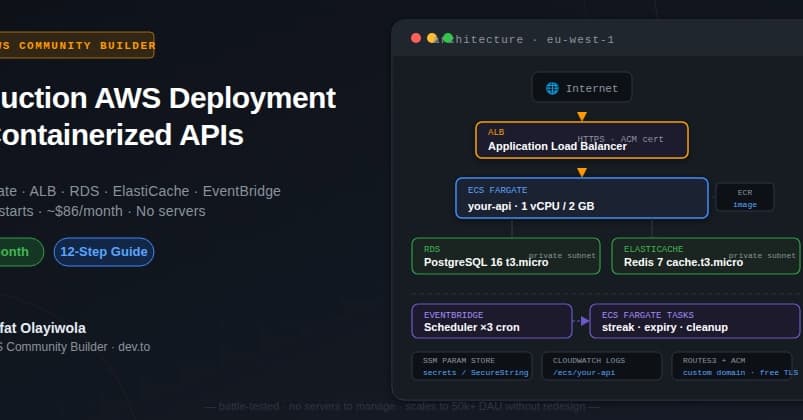
Deploy a Production-Grade Containerized API on AWS for ~$86/month
Arafat Olayiwola, a 5x AWS Community Builder, published a detailed guide on deploying a containerized Python API with FastAPI on AWS ECS Fargate. The architecture includes an Application Load Balancer (ALB) with ACM, RDS PostgreSQL, ElastiCache Redis, SSM Parameter Store for secrets, and EventBridge Scheduler for cron jobs. Total cost: ~$86/month at the MVP tier.
Why ECS Fargate Over Lambda or EC2?
Lambda struggles when your dependency footprint grows. A full production Python stack — ORM, async DB driver, Redis client, third-party SDKs — can exceed Lambda's 250 MB unzipped limit. Fargate sidesteps that: your Dockerfile is the deployment artifact, and AWS manages compute.
With Fargate, you pay per second of task runtime and never SSH into an instance. You lose OS tuning, but for API workloads, that's almost always acceptable.
Architecture at a Glance
The stack uses five core AWS services:
- ECS Fargate: 1 vCPU / 2 GB, 24/7 task (~$36/mo)
- ALB + ACM: HTTPS ingress, free cert (~$18/mo)
- RDS PostgreSQL 16: db.t3.micro, 20 GB gp2 (~$17/mo)
- ElastiCache Redis 7: cache.t3.micro (~$14/mo)
- EventBridge Scheduler: 3 cron rules (free)
- ECR: <1 GB image (~$0.05/mo)
- CloudWatch Logs:
1.5 GB/month ($1/mo)
Reserving RDS and ElastiCache for 1 year drops the total to ~$74/month.
Step 1: VPC and Security Groups
Olayiwola uses the default VPC for single-region MVPs. Security groups follow least privilege:
- ALB SG: allows inbound HTTPS (443) and HTTP (80) from 0.0.0.0/0.
- App SG: allows inbound on port 8000 only from the ALB SG, and all outbound traffic.
- DB SG: allows inbound on port 5432 only from the App SG.
- Redis SG: allows inbound on port 6379 only from the App SG.
This chain ensures no direct internet access to database or cache.
Step 2: RDS PostgreSQL 16
The guide creates a db.t3.micro instance with --no-publicly-accessible, --backup-retention-period 7, and --deletion-protection. For local migrations, you temporarily open port 5432 to your IP, run migrations, and lock it back down:
MY_IP=$(curl -s https://checkip.amazonaws.com)
aws ec2 authorize-security-group-ingress \
  --group-id $DB_SG --protocol tcp --port 5432 --cidr "${MY_IP}/32"
# run migrations
aws ec2 revoke-security-group-ingress \
  --group-id $DB_SG --protocol tcp --port 5432 --cidr "${MY_IP}/32"
Step 3: ElastiCache Redis 7
Redis 7 on cache.t3.micro handles rate limiting, session state, and caching for thousands of concurrent users at this tier.
Step 4: Secrets Management with SSM Parameter Store
Hardcoded env vars in Dockerfiles or task definitions end up in git history. Olayiwola uses SSM SecureString parameters encrypted with KMS:
put_param() {
  aws ssm put-parameter \
    --name "/myapp/production/$1" \
    --value "$2" \
    --type SecureString \
    --overwrite
}
put_param "DATABASE_URL" "postgresql+asyncpg://myapp:@${DB_HOST}:5432/myapp"
put_param "APP_SECRET_KEY" "$(openssl rand -hex 32)"
Naming convention /app/environment/KEY lets you scope IAM policies to a path prefix.
Step 5: Multi-Stage Dockerfile
The article provides a production-ready multi-stage Dockerfile:
- Builder stage: installs build dependencies and Python packages.
- Production stage: copies only the installed packages, adds a non-root user, and runs gunicorn with Uvicorn workers.
Key settings: --workers 2, --timeout 120, health check on /health every 30s.
Step 6: ECS Fargate Task Definition
The task definition references SSM parameters for secrets, and uses the awsvpc network mode. The ALB target group uses health checks on the /health endpoint.
Step 7: EventBridge Scheduler for Cron Jobs
Instead of Lambda functions or EC2 instances, Olayiwola uses EventBridge Scheduler to trigger one-shot ECS Fargate tasks on the same Docker image. This avoids packaging separate scripts and keeps the deployment simple.
Why This Matters
This architecture is a battle-tested pattern for containerized APIs in production. It eliminates server management, scales predictably, and costs less than a typical SaaS subscription. The guide includes every CLI command — no gaps.
Next Steps
Clone the repository, follow the steps in order, and adapt the Dockerfile to your application. Reserve RDS and ElastiCache for 1 year to save 14%. Then, set up CI/CD with GitHub Actions or AWS CodePipeline.

